GST-compliant invoices
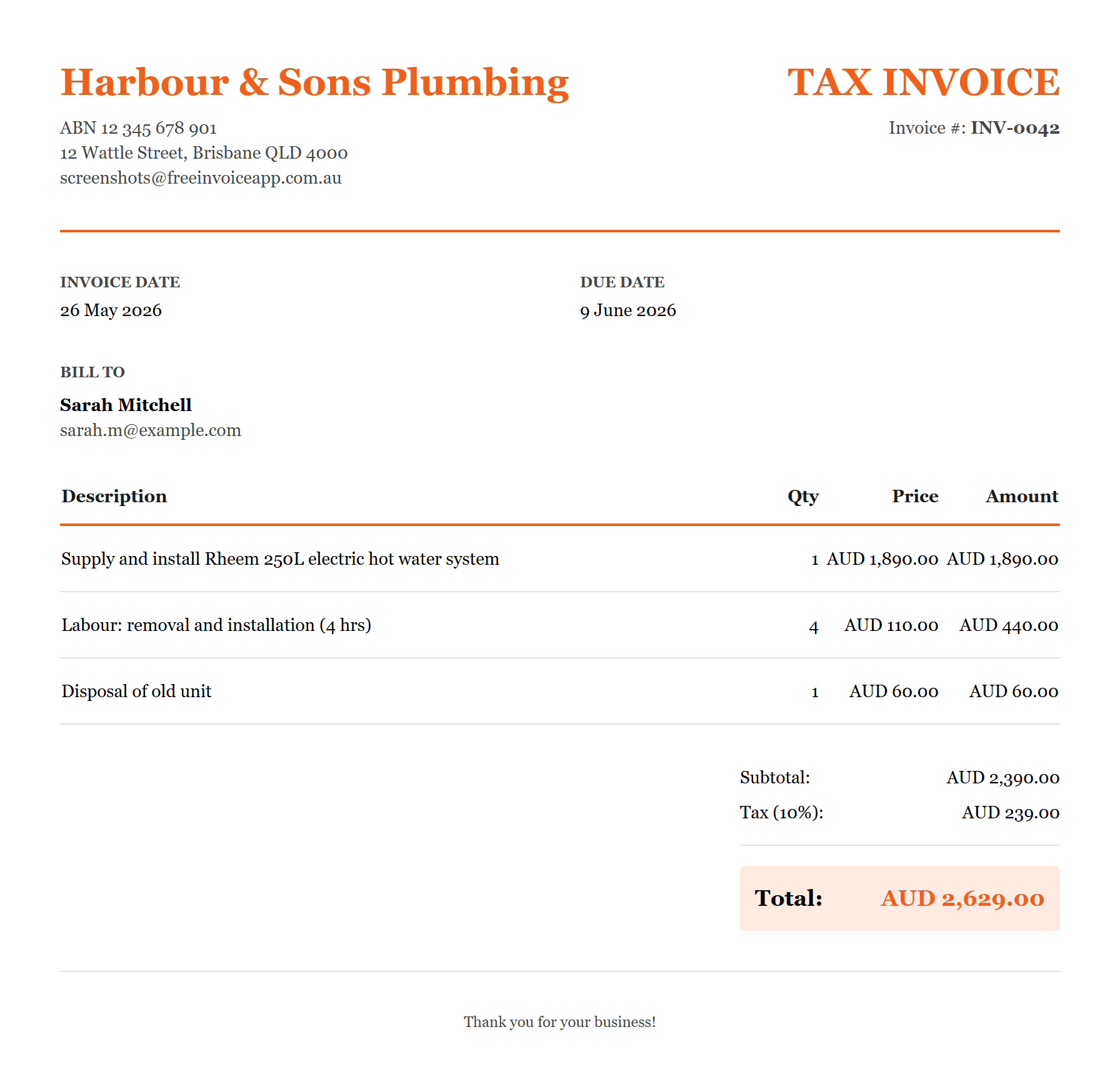
Itemised line items, automatic 10% GST, ABN fields and due dates, formatted as a valid Australian tax invoice. Export a PDF or email it straight to the client with your logo and brand colour on it.
Invoicing for Australian businesses
Create a GST-compliant tax invoice in under a minute with software built for Australia. Send it by email and SMS with a secure card payment button, and let the platform chase anyone who is slow to pay.
Free plan, no credit card. Pro from A$9 a month, with annual billing available.
Already using Daylane? Connect your accounts to invoice completed jobs. Plans billed separately.
How it works
Add your business details, ABN, bank details, clients and services. Saved once, reused on every invoice you ever send.
Build an itemised, GST-ready tax invoice and send it by email and SMS with a secure Pay now button attached.
Track every invoice from draft to paid. Reminders and chase sequences follow up on late payers without you lifting a finger.
Platform
Word documents give you no visibility into what has been sent or what is outstanding. Full accounting suites cost ten times what you need and bury invoicing under features you will never touch. Free Invoice App sits deliberately in between: professional enough for a real business, simple enough to invoice in under a minute.
Itemised line items, automatic 10% GST, ABN fields and due dates, formatted as a valid Australian tax invoice. Export a PDF or email it straight to the client with your logo and brand colour on it.
Add a secure Pay now button to any invoice. The money settles into your own Stripe account and the invoice marks itself paid the moment payment lands. Bank transfer details stay free, always.
Invoices arrive as a professional PDF in the inbox and, on Pro and Pro+, as a short text message with a pay link. Emails get ignored, texts get read.
Photograph a receipt with your phone and the amount, GST, date, merchant and category are read for you, with the photo kept as proof for tax time. Included on every plan.
Store every client once and reuse their details forever. On Pro+, give your bookkeeper or business partner their own viewer or editor access while you stay in control.
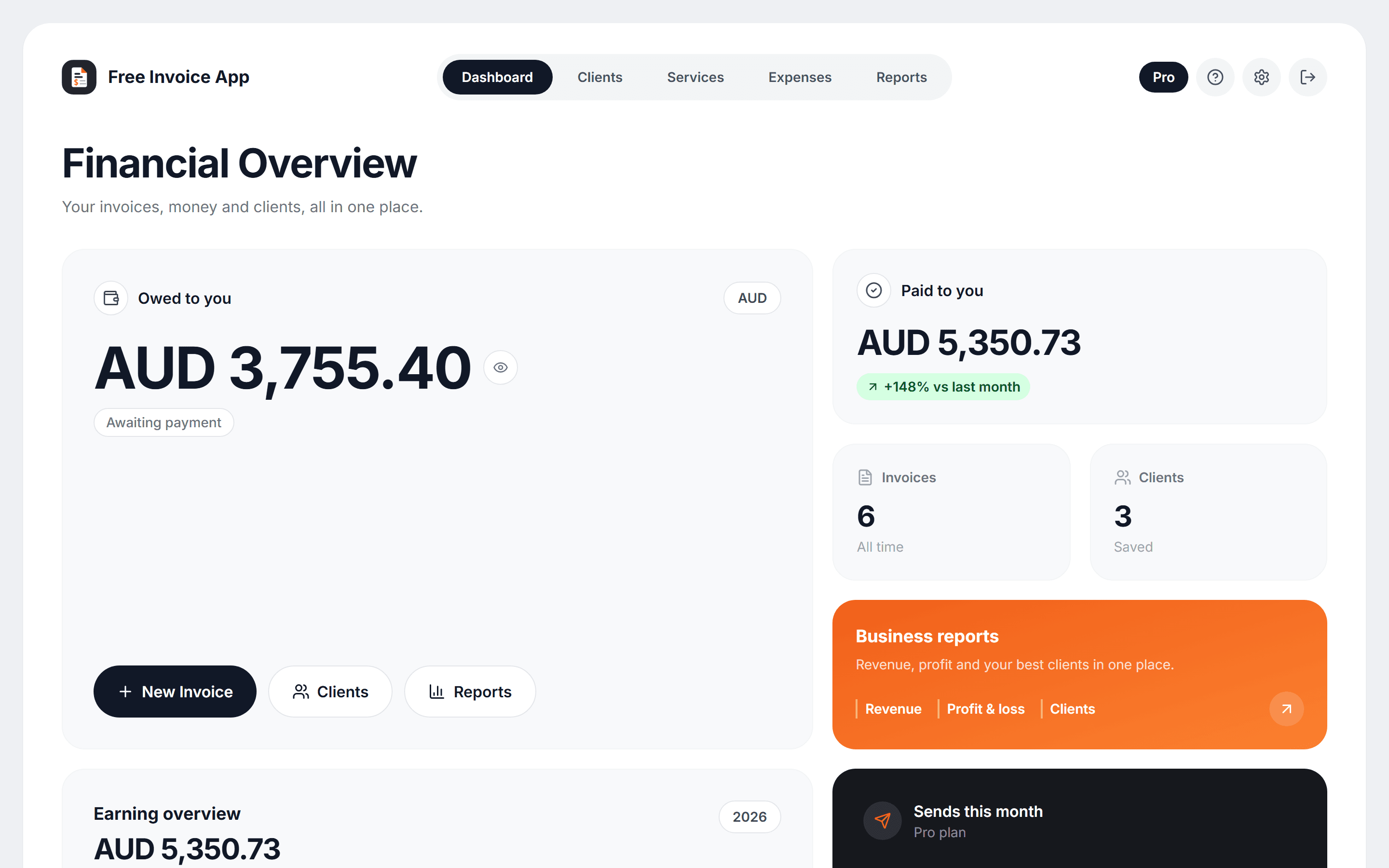
Track spending across 13+ categories, then see revenue, profit and loss and client-level insights, so you know where the business stands without a separate accounting tool.
Automation
The hours you spend writing invoices, remembering to send them and chasing late payers are hours you are not billing. Pro and Pro+ hand that work to the platform.
The Pro+ chase ladder
Chasing stops the moment the invoice is marked paid.
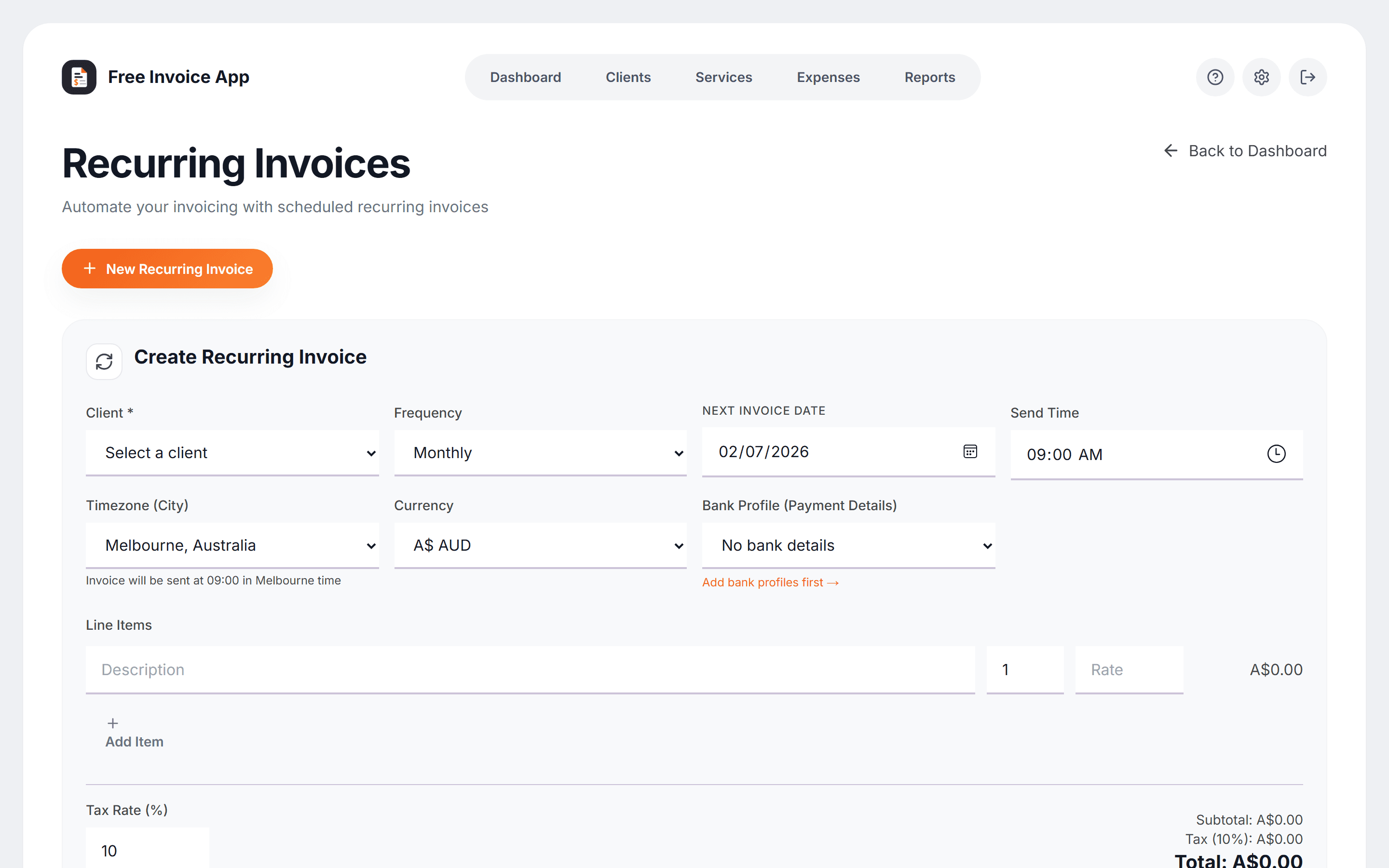
Bill weekly, fortnightly or monthly. Invoices generate and send on schedule, every time.
Prepare an invoice now and have it land at exactly the right moment later.
Clients get a monthly summary of what they were invoiced and what is still outstanding.
A nudge 3 days before the due date, a reminder on the day, then firmer follow-ups at 3, 7 and 14 days overdue. Chasing stops the moment an invoice is paid.
Clients with an Australian mobile on file also get a short text with a pay link when you invoice or remind. Pro includes 25 messages a month; Pro+ includes 100, plus texts on the due date and the 7- and 14-day chase steps.
Send material receipts, a signed quote or site photos with the invoice itself, so the client has the evidence in the same email. 3 files per invoice on Pro, 10 on Pro+.
Invoices arrive from invoices@yourbusiness.com.au for stronger branding and better deliverability.
Set your T&Cs once per service and they print automatically on every invoice that includes it.
Add up to two team members with viewer or editor roles. Your bookkeeper works, you stay owner.
Who it is for
Tradies invoicing from the job site, freelancers billing milestones, sole traders handling their own BAS. GST, ABNs and ATO tax-invoice rules are built in from the ground up, not bolted onto an American product.
Create an Australian invoice with ABN and GST, then download the PDF free.
Build a professional quote with scope, GST, deposit and terms, then download the PDF.
Confirm a completed payment with GST, payment method and a clean PDF receipt.
Exactly what a valid Australian tax invoice must show, in plain English.
A compliant template you can copy in 30 seconds, with GST worked out for you.
Five free invoicing tools tested against real Australian requirements.
Photograph a receipt and it files itself against an ATO category.
Now connects with Daylane
Plan your field work in Daylane, then turn a completed job into an invoice draft in Free Invoice App. Your customer and work details come across for review, with your invoice numbering, branding and payment details ready to use.
Separate accounts, plans and billing. Your Free Invoice App plan limits still apply. Starter stays free; paid plans in each app are purchased separately.
Connect your accounts in DaylaneExplore DaylaneOpen Settings → Invoicing in Daylane. Sign in to Free Invoice App and approve the connection as the account owner.
Complete the job in Daylane, check the customer, work details and amount, then save the invoice draft to Free Invoice App.
Review the invoice and recipient, then send through Free Invoice App from Daylane. You can also open and edit the invoice in Free Invoice App.
Pricing
Start free and upgrade when the automation pays for itself. No setup fees or hidden charges. Choose monthly billing or save two months with annual billing, and cancel from Settings any time. Daylane subscriptions are separate and do not include a paid Free Invoice App plan.
For trying the platform or low-volume invoicing
For businesses that invoice every week
or A$90/year · two months free
Get started with ProFor growing businesses and teams
or A$245/year · two months free
Get started with Pro+From 1 October 2026, Free Invoice App will stop charging platform transaction fees. Stripe processing fees still apply. All invoice sends will count towards your plan: Starter 7 per month, Pro 250, Pro+ unlimited. The change starts at the monthly reset, 10 am AEST (00:00 UTC). Invoice creation and PDF downloads stay unlimited and free.
Payment and sending termsUntil the 1 October 2026 monthly reset, Stripe processing fees apply plus a platform fee of 1.15% on Starter, 0.65% on Pro or 0.25% on Pro+ (minimum A$0.25, plus GST where applicable). From that reset, Free Invoice App adds no platform transaction fee. Bank-transfer details on your invoices are free on every plan. Starter includes 7 sends per month, Pro 250 and Pro+ unlimited. Until the 1 October 2026 monthly reset, invoices sent with an available card payment option are exempt. From that reset, they count too. Each CC recipient and manual reminder also uses a send. Allowances reset on the first of each month at 00:00 UTC.
Payroll administration · Pro+ add-on
Prepare ordinary pay, calculate PAYG and super, issue payslips and manage leave, timesheets and expenses. Give employees their own secure payroll portal.
A$19/month
Includes 3 distinct employees recorded as paid per billing month, then A$3 each beyond 3, billed in arrears. Pro+ required separately.
STP reporting and payments are external. Use your existing provider or registered agent to lodge STP, your bank to pay wages and your provider to pay super. This add-on does not lodge with the ATO or transfer money.
Explore the workflow and supported scopeYes. Start in Daylane Settings → Invoicing, sign in to Free Invoice App and approve the connection as the account owner. From a completed Daylane Job, review the customer and work details, create an invoice draft, then confirm the recipient before sending. The invoice lives in Free Invoice App with your numbering, branding and payment details. You can disconnect from either app.
No. Each app has its own account, plan and billing. Connecting them does not upgrade either plan or combine allowances. Free Invoice App Starter remains free with its usual limits; Pro and Pro+ are purchased separately from Daylane. A paid Free Invoice App plan does not include a Daylane subscription either.
Yes. The Starter plan is A$0 per month, forever - no credit card required to sign up. You can create unlimited invoices, export PDFs, manage clients, track expenses and view reports. Starter includes 7 sends per month, Pro 250 and Pro+ unlimited. Until the 1 October 2026 monthly reset, invoices sent with an available card payment option are exempt. From that reset, they count too. Each CC recipient and manual reminder also uses a send. Allowances reset on the first of each month at 00:00 UTC.
Yes. Invoices include ABN fields, itemised GST calculations and the formatting required for Australian tax invoices, so the documents you send meet ATO requirements out of the box.
Yes. You can cancel monthly or annual billing from Settings at any time. Your paid plan stays active until the end of the current billing period, then you return to the free Starter plan and keep your data.
On Pro+, you can connect your own domain so invoices arrive from an address like invoices@yourbusiness.com.au. Setup takes a few minutes - we provide the DNS records and verify them for you.
Pro+ supports up to two additional team members, each with a viewer (read-only) or editor (full invoicing) role. The account owner keeps full control and can remove members at any time.
Yes, on Pro+. Automated chase sequences follow up every unpaid invoice on a set-and-forget schedule: a friendly nudge 3 days before the due date, a reminder on the due date, and firmer follow-ups 3, 7 and 14 days after. Configure the ladder once in Settings and it runs by itself - each step is sent at most once per invoice, chasing stops the moment an invoice is marked paid, and you can pause it for any individual invoice. Every plan also includes one-click manual reminders.
Yes, on Pro and Pro+. Switch on SMS notifications in Settings and clients who have an Australian mobile number saved also receive a short text - with a link to view and pay the invoice - whenever you send them an invoice or reminder. Pro includes 25 SMS a month; Pro+ includes 100 and also texts on the due date and the 7- and 14-day automated chase steps. Every message names your business, and clients can opt out at any time. Emails always go out as normal alongside the texts, so a client without a mobile saved still gets their invoice.
Yes, on Pro and Pro+. Add material receipts, a signed quote, a variation approval or job photos and they go out attached to the same email as the invoice PDF, so your client has the evidence without you sending a second message. Pro allows 3 files per invoice and Pro+ allows 10, up to 10MB in total on either plan. PDF, JPEG, PNG and WebP files are supported, and photos are shrunk automatically so the email still lands. Attachments do not use up your monthly send allowance.
Yes, on every plan. Switch on card payments in Settings and your invoices include a secure Pay now button. Payments settle to your own Stripe account and invoices are marked paid automatically. Until the 1 October 2026 monthly reset, Stripe processing fees apply plus a platform fee of 1.15% on Starter, 0.65% on Pro or 0.25% on Pro+ (minimum A$0.25, plus GST where applicable). From that reset, Free Invoice App adds no platform transaction fee. Showing bank-transfer details on your invoices remains free. Starter includes 7 sends per month, Pro 250 and Pro+ unlimited. Until the 1 October 2026 monthly reset, invoices sent with an available card payment option are exempt. From that reset, they count too. Each CC recipient and manual reminder also uses a send. Allowances reset on the first of each month at 00:00 UTC.
Yes. The AI Expense Scanner is included on every plan: photograph a receipt with your phone and the amount, GST, date, merchant and category are read automatically, with the photo saved as proof. Starter includes 3 scans a month, Pro 30 and Pro+ 100. It runs in your browser - no app install needed - and works best on your phone so you can use the camera directly.
No. Free Invoice App runs in any modern web browser and is built mobile-first, so it works on a phone as well as a laptop - useful for tradies invoicing from the job site. You can add it to your phone home screen and it opens like an app, with nothing to download and nothing to update. Native Android and iOS apps are in development.
Roadmap
Card payments, the AI receipt scanner and invoice attachments all started as requests on this page. Tell us what you want next, especially the features you would pay for.
Coming next: per-invoice template overrides, so you can pick a different template or accent colour for an individual invoice instead of only your saved brand default.
A quick note is perfect. If it is a good fit, we will follow up.
Free to start, no credit card required, and you will have a professional Australian tax invoice in a client’s inbox within minutes.